Bathroom Fan Controller Circuit Diagram

Many bathrooms are fitted with a fan to vent  excess humidity while someone is showering. This fan can be connected to the light  switch, but then it runs even if you only want  to brush your teeth. A better solution is to  equip the fan with a humidity sensor. A disadvantage of this approach is that by the time  the humidity sensor switches on the fan, the  room is already too humid. Consequently, we decided to build a circuit  that operates by sensing the temperature of  the hot water line to the shower. The fan runs  as soon as the water line becomes hot. It continues to run for a few minutes after the line  cools down, so that you have considerably  fewer problems with humidity in the bathroom without having the fan run for no reason.

Naturally, this is only possible if you can  fit a temperature sensor somewhere on the  hot water line and the line does not become  warm if hot water is used somewhere else. We use an LM335 as the temperature sensor.  It generates an output voltage of 10 mV per  Kelvin. The output voltage is 3.03 V at 30 °C,  3.13 V at 40 °C, 3.23 V at 50 °C, and so on.  We want to have the fan switch on at a temperature somewhere between 40 and 50 °C (approx.100–150 °F). To do this accurately,we first use the opamps in IC2 to improve  the control range. Otherwise we would have  an unstable circuit because the voltage differences at the output of IC1 are relatively  small. IC2a subtracts a voltage of exactly 3.0 V from  the output voltage of IC1.

Bathroom Fan Controller Circuit Diagram


 Bathroom Fan Controller Circuit Diagram

It uses Zener diode  D1 for this purpose, so this is not dependent on the value of the supply voltage. The  value of R2 must be selected according to  the actual supply voltage so that the current through D1 is approximately 5 mA. It is  600 Ω with a 6-V supply (560 Ω is also okay),  or 2400 Ω (2.2 kΩ) with a 15-V supply. If you  have to choose between two values, use the  lower value. IC2b amplifies the output voltage of IC2a  by a factor of 16 ((R7 + R8) ÷ R8). As a result,  the voltage at the output of IC2b is 0.48 V at  30 °C, 2.08 V at 40 °C (104 °F), and 3.68 V at  50 °C (122 °F). Comparator IC3a compares this  voltage to a reference voltage set by P1. Due  to variations resulting from the tolerances of  the resistor values, the setting of P1 is best  determined experimentally. A voltage of 2.5 V  on the wiper should be a good starting point  (in theory, this corresponds to 42.6 °C).

When  the water line is warm enough, the output of IC3 goes Low. R10  provides  hysteresis  at  the  output  of  IC3a by pulling the voltage on the wiper of  the setting potentiometer down a bit when  the output of IC3a goes Low. IC3b acts as an  inverter so that relay Re1 is energised via T1,  which causes the fan to start running. After  the water line cools down, the relay is de-energised and the fan stops. If this happens  too quickly, you can reduce the value of R11  (to 33 kΩ, for example). This increases the  hysteresis. The circuit does not draw much current, and  the supply voltage is noncritical. A charging  adapter from a discarded mobile phone can  thus be used to power the circuit. If the supply voltage drops slightly when the relay is  energised, this will not create any problem.  In this case the voltage on the wiper of P1 will  also drop slightly, which provides a bit more  hysteresis on IC3a.

Author : Heino Peters - Copyright : Elektor
Read More

Simple Wireless Baby Monitor Project

This wireless baby monitor circuit using FM is designed to operate at a frequency of  100MHzefy tested. Its range of transmission is more than 100 metres with a 75cm wire antenna. The circuit is fully transistorised and so even a beginner can easily assemble it on a veroboard or the PCB whose pattern is given below for convenience.

Simple Wireless Baby Monitor Project


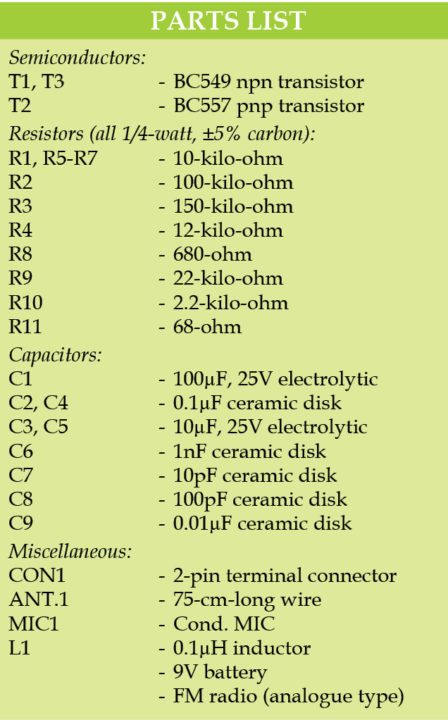
Circuit diagram of the wireless baby monitor circuit is shown in Fig. 1. It is built around a condenser microphone (MIC1), transistors BC549 (T1 and T3) and BC557 (T2), along with a few other components.

T1 and T2 provide high-gain audio to the VHF oscillator wired around T3. BC549 can oscillate well in VHF range. Frequency-modulated (FM) signals are transmitted through antenna ANT.1.

By adjusting trimmer capacitor VC1, frequency can be set within 88MHz -108MHz band. Using a good FM radio (analogue type) receiver, transmitted signals can be heard. Do not use a mobile phone as receiver.

This unit with 9-volt battery can be kept near a baby’s bed. Any sound generated by the baby including a cry can be monitored wirelessly from another room. Readily available 1-micro Henry inductor can be used as L1. It can also be home brewed as shown in Fig. 2.

Construction and testing

A single side PCB pattern of the wireless baby monitor circuit is shown in Fig. 3 and its component layout in Fig. 4. After assembling the circuit on a PCB, enclose it in a plastic case and keep it near the baby’s bed.


Read More

Simple Dog Whistle for Ronja Circuit Diagram

This is the Simple Dog Whistle for Ronja Circuit Diagram. Ronja is the author’s dog, a beagle-mongrel,  who seems increasingly often to need to be  called to heel either with a shout or with a  whistle. And so the idea came about for an  electronic dog whistle that could produce  two alternating high-frequency tones. A  design like this has several advantages over  conventional whistles or calling.
 
Circuit diagram :
Simple Dog Whistle for Ronja Circuit Diagram

Dog Whistle for Ronja Circuit Diagram
 
  • You can continue to carry on a conversation with your friends without having to  stop to whistle or call to your dog.
  • Using high frequencies means that  the whistle sound is barely audible to  (especially older) humans and so is less  annoying to other people than conventional whistles or calls. As is well known,  dogs have rather better hearing than  we do and can hear frequencies of up to  40 kHz.
  • The two alternating pitches mean that the  dog can more easily distinguish it from  other whistles.
 
The dog whistle is constructed from two  standard 555 timer ICs (or a single 556 IC),  both wired as astable multivibrators. The  first 555 oscillates at around 1.5 Hz and modulates the frequency of the second, which thus  switches between two different frequencies  every 0.7 seconds or so. The output of the second 555 is connected to a piezo sounder. If the  volume from the sounder used is insufficient, a small transistor amplifier can be added  between it and the output of the second 555. The circuit draws current only when activated by pressing S1. An optional green  LED indicates that the circuit is functioning.  When S2 is pressed the output frequencies  are reduced, making them more audible to  human ears for test purposes.
 
R1, R2 and C1 set the frequency of astable  multivibrator IC1. Diode D1 ensures that the  output is a symmetrical squarewave, by making C1 charge only via R1 and discharge only  via R2. Turning to IC2, where there is no diode in the  circuit, capacitor C2 is charged via R3 and R4  and discharged only via R4. With C2 = 22nF  the 555 oscillates at about 10 kHz; with S2  pressed, and hence C3 in parallel with C2, this  falls to about 1.8 kHz. Changing C2 to 10 nF  results in an even higher frequency (about  22 kHz), which can only be heard by dogs  and certain other animals. Setting C2 to 15 nF gives an output frequency of about 15 kHz. IC1 modulates the frequency of IC2 via R5. The green LED D2 is connected to the output  of IC1 via a series resistor and thus flashes at  the modulation frequency. The output from the piezo sounder at 10 kHz  (C2 = 22 nF) should be loud enough to verify  by ear. If desired, a more efficient piezo horn  tweeter can be used instead.


Author : Stefan Hoffmann
Read More

Automatic Plant Irrigator

The circuit presented here waters your plants regularly when you are out for a vacation. The circuit comprises a sensor part built using only one op-amp (N1) of quad op-amp IC LM324. Op-amp N1 is configured here as a comparator. Two stiff cop-per wires are inserted in the soil containing plants. As long as the soil is wet, conductivity is maintained and the circuit remains off. When the soil dries out, the resistance between the copper wires (sensor probes A and B) increases. If the resistance increases beyond a preset limit, output pin 1 of op-amp N1 goes ‘low’. 

Circuit diagram :
Automatic Plant Irrigator -Circuit -Diagram Automatic Plant Irrigator Circuit Diagram

This triggers timer IC2 (NE 555) configured as a monostable multivibrator. As a result, relay RL1 is activated for a preset time. The water pump starts immediately to supply water to the plants. As soon as the soil becomes sufficiently wet, the resistance between sensor probes decreases rapidly. This causes pin 1 of op-amp N1 to go ‘high’. LED1 glows to indicate the presence of adequate water in the soil. The threshold point at which the output of op-amp N1 goes ‘low’ can be changed with the help of preset VR1. To arrange the circuit, insert copper wires in the soil to a depth of about 2 cm,keeping them 3 cm apart. When the soil the water. LED1 glows up as the water reaches the probes.

For small areas a small pump such as the one used in air coolers is able to pump enough water within 5 to 6 seconds. The timing components for IC2 are selected accordingly. The timing can be varied with the help of preset VR2. The circuit is more effective indoors if one intends to use it for long periods. This is because the water from reservoir (bucket, etc) evaporates rapidly if it is kept in the open. For regulating the flow of water, either a tap can be used or one end of a rubber pipe can be blocked using Mseal compound, with holes punc-gets dried, adjust VR1 towards ground rail until LED1 turns off and relay RL1 is energised. The motor starts pumping tured along its length to water several plants.


Author: Priyank MudgaL - Copyright: Efymag
Read More

Power-up/down Sequencer Circuit Diagram

Whether you’re talking about a home cinema  or a computer system, it’s very often the case  that the various elements of the system have  to be turned on or off in a quite specific order,  or at least, automatically. Constructing this  sort of automation system is well within the  capability of any electronics enthusiast worthy of the name, but in this ‘all-digital’ age,  most of the circuits of this type to be found  in amateur electronics magazines or web-sites use a microcontroller. Even though that  is indeed a logical solution (in  more ways than one!), and you  might even say the easiest one, it  does pose problems for all those  people who don’t (yet) have the  facilities for programming these  types  of  IC.  So  we  decided  to  offer you now an approach that’s  very different, as it only uses a  simple, cheap, commonly-avail-able analogue integrated circuit,  which of course doesn’t have to  be programmed. Our project in  fact uses as it’s ‘brain’ an LM3914,  a familiar IC from National Semiconductors,  usually  used  for  driving  LED  VU  (volume  unit)  meters. 

Circuit diagram :
Power-up-down Sequencer Circuitw
Power-up/down Sequencer Circuit Diagram

Before taking a look at the circuit  for  our  project,  let ’s  just  remind ourselves that the IC has  one analogue input and ten out-puts intended for driving LEDs.  It can operate in ‘point’ mode,  where the LEDs light up in turn,  from first to last, depending on  the input voltage, but only one LED is lit at  any given time. Alternatively  it can operate  in ‘bar’ mode (this is the mode normally used  for VU meters), and in this case, the LEDs light  up one after the other, in such a way as to create a strip of light (bar) that is longer or  shorter according to the input voltage. This is  the mode selected for the LM3914 in the circuit described in some detail below. 

So as to be able to control the AC powered equipment  our  sequencer  is  intended  to manage, we are using solid-state relays — four, in our example, though you can reduce or increase this number, up to a maximum of ten. Since the input devices in solid-state relays are LEDs, they can be driven directly by the LM3914 outputs, since that’s exactly what they’re designed for. As only four relays  are available, these are spread across out-puts L2, L4, L6, and L8, but you can choose  any arrangement you like to suit the number  of relays you want to use. 

Resistor R7 connected to pin 7 of the LM3914  sets the current fed to the LEDs by the LM3914  outputs. Here, it’s been set to 20 mA, since  that is the value expected by the solid-state  relays chosen. The input voltage applied to  pin 5 of the LM3914 is none other than the  voltage present across capacitor C1 — and  this is where the circuit is ingenious. When  the switch is set to ‘on’, C1 charges slowly  through R5, and the LEDs of the solid-state  relays on the outputs light one after another  as this voltage increases; in this way, the units  being controlled are powered up in the order you’ve chosen. To power-down, all you have  to do is flip the switch so that C1 discharges  through  R5,  and  the  LEDs  go  out  in  the  reverse order to that in which they were lit,  in turn powering down the units connected to the solid-state relays. Easy, isn’t it? If you’re not happy with the sequence speed,  all you need do is increase or reduce the  value of R5 in order to alter the speed one  way or the other.
The circuit needs to be powered from a volt-age of around 9 to 12 V, which doesn’t even  need to be stabilized. A simple ‘plug-top’,  ‘wall wart’ or ‘battery eliminator’ unit will be  perfect, just as long as it is capable of supply-ing enough current to power all the LEDs. As  the LED current is set by R7 to 20 mA per LED,  it’ll be easy for you to work out the current  required, according to the number of solid-state relays you’re using. 

In our prototype the type S216S02 relays  from Sharp were used, mainly because they  proved readily available by mail order. They also have the advantage of being compact,  and their switching capacity of 16 A means  you can dispense with a heatsink if you’re  using them for a computer or home cinema  system, where the current drawn by the vari-ous units can be expected to remain under  1 A. These solid-state relays must be protected by a fuse, the rating of which needs to  be selected according to the current drawn  by the devices being powered. 

Also note the presence across the relay terminals of a VDR, also known as a GeMOV or  SiOV, intended to protect them from any spurious voltage spikes. You can use any type  that ’s intended for operation on 250 VAC  without any problem. The values of fuses F1  to F4 are of course going to depend on the  load being protected. 

Construction of the circuit shouldn’t present any particular difficulty, but as the solid-state relays are connected directly to AC  power, it is essential to install it in a fully-insulated case; the case can also be used to  mount the power outlet sockets controlled  by the circuit. Note that sockets are female  components.
Let’s just end this description with the sole  restriction imposed by our circuit — but it’s  very easy to comply with, given the intended  use. In order to remain triggered, the solid-state relays must carry a minimum holding  current, which is 50 mA in the case of the  devices we’ve selected. In practical terms,  this just means that each of the devices powered by our sequencer must draw at least  50 mA, or in other words roughly 12 VA at  230 VAC, or 25 VA at 120 VAC.

Author :Christian Tavernier
Read More

Universal Ding-Dong Circuit Diagram

One frequently finds gongs or chimes for sale in antique shops or Eastern markets. But supposing one would want to wire these to a pushbutton at the front door to create a ding-dong doorbell? How would this be done? Or consider, for a moment, more creative possibilities. How would one e.g. cause wine-glasses or African drums to resonate when a doorbell is pressed?

The circuit shown in Fig. 1 provides a mechanical means of striking two gongs or chimes in sequence -- one when the doorbell is pressed, the other when it is released. This it does by briefly activating two solenoids in succession -- or even two motors to which suitable hammers are attached. It is a circuit which was rejected by a publisher, for the reason that it was thought to be too complex -- which really it is. I had been designing various embodiments of the same idea, and this embodiment was not the most elegant. Having said this, it works perfectly well.

The circuit is unusual from the point of view that it is based on two pulse shorteners, IC1a and IC1b. These are essentially two monostable timers with special arrangements at their inputs. Of critical importance, in these circuits, is that the potential between S1 and R1 should change fairly rapidly when S1 is pressed, and that the trigger inputs of IC1a and IC1b should be suitably biased.


Circuit Project: Universal Ding-Dong

C2 serves to debounce pushbutton switch S1 – however, its value cannot be too high, due to the requirements of the pulse shortener circuit. TR1 and R2 serve as an inverter. IC1a is effectively a negative-edge-triggered monostable timer, so that when pushbutton switch S1 is pressed, IC1a's output goes “high”, TR2 conducts, and solenoid SOL1 is activated. D1 suppresses back-EMF, which could potentially destroy the IC.

When pushbutton S1 is released, C2 rapidly discharges through R1. IC1b is effectively a positive-edge-triggered monostable timer, so that when IC1b's output goes "high", TR3 conducts, activating solenoid SOL2. D2 is again provided to suppress back-EMF. R9 and R10 are not strictly necessary in the circuit, but limit damage in the unlikely event of the failure of TR2 or TR3.

Unless a large battery is used for B1, C1 is needed to provide the "whack" required for solenoids SOL1 and SOL2. If the pulses which activate SOL1 and SOL2 seem to be too long or too short (they are less than a tenth of a second each as shown), the values of R7 and C5, respectively R8 and C6, may be adjusted according to the formula t = 1.1 R C seconds. TR1 is a miniature MOSFET. If an equivalent is required, it may be replaced with the same MOSFET as is used for TR2 and TR3. If TR2 and TR3 are not to be found, rough equivalents may be used, on condition that their gate voltage is at least a quarter below the supply voltage.

Ideally, solenoids SOL1 and SOL2 would be 12V push-action types, or pull-action types which have a thrust pin at the back. However, plain pull-action types should work if they are touching the chimes or gongs when the circuit is at rest (they would then pull back, bounce, and strike). Small DC motors may be used with hammers attached, with suitable series resistors if required. These would likely need longer timing periods for monostable timers IC1a and IC1b.

The circuit may use the (original) bipolar version of the 555 timer IC, or its more recent CMOS equivalents. If a CMOS equivalent is used, standby current is likely to be below 2mA. That is, an AA alkaline battery pack would last about two months on standby. For longer periods, a regulated power supply is recommended. The supply voltage will ideally be 12V, but may be reduced to 9V.

Copyright Rev. Thomas Scarborough
[Contact the author of this article at scarboro@iafrica.com]
Read More

Heater and Ventilation Control

This is a guest post by our visitor Etienne F. For any questions please contact the author (email address link is given below). This circuit control a heater and a fan at variable speed and intensity with over temp and under temp alarm. The control work with a thermistor for the temperature reading and the setpoint is variable. The speed and intensity work with a difference between the temperature reading and a setpoint. At all time, only one of the system works (heat or ventilation) or if the temperature is near the setpoint, none of them work.

1st block: temperature reading and setpoint voltage:
The reading of the temperature to generate voltage

Difference between set point and temeprature reading:


For the first PWM voltage value, the input from the LM324 subtract the temp reading and the setpoint. The result is multiply by the pot between the out and the + input of op amp U2b (ratio from the resistance and the pot.) (Value in ohms). The result is send to the – input of Op amp U2c and the second 100K pot is use to set the offset voltage (2Vdc in my circuit). The result is send to the input of the PWM control block. The correct ratio should be around 2 :1 (multiply by 2 the voltage) The 1N4007 Diode keep the voltage over 0V (the result of the subtractions can be negative but the PWM need a voltage between 0 and 12V DC)

The voltage for the LM324 is +12 and -12VDC (pin 4 and 11) The second block subtract the setpoint voltage to the temperature reading. The result is multiply by the pot. (Depending of the value of the potentiometer). The ratio between the 56K resistance and the value of the potentiometer define the multiply ratio. The output equation is Vin X (Pot /R1) = -Vout The next op amp input add a voltage value to the result (2V) and the last amp is used to reverse the result. 


3rd block: voltage generator proportional to a high temperature (PWM)

The block consists of an LM324 (quad op amp) which is used as a comparator (compare the temperature reading at set point), a square wave generator whose frequency varies according to the set point and the temperature reading. This square wave into an oscillator circuit which, after being compared to the set point (which is a triangle wave that varies between 4V and 9V has a frequency of 45Hz). The triangular wave enters into a circuit to be compared to the value of reading. When the reading exceeds the value of the triangular wave form is a square wave and the output is 12V.

More reading approaches the set point, the longer the 12V signal is activate and when the reading exceeds the maximum of the triangular wave (9V), the fan runs at maximum speed. The square wave into a MOSFET to be amplify (the ratio of on / off is increased). The duration of the excess voltage determines the duration of 12 V. The 0.1uF capacitor (C3) between the + and – of the load makes the signal clearer.

High and Low Temp Alarm:

Part list :

U1, U2, U3, U4, U5 : LM324 quad amp
Q1 : IRF521 MOFFSET
Q2 : TIP31C
D1, D2, D3, D4 : 1N4007
C1 and C2 : 1uF capacitor
C3 and C4 : .1uF capacitor
47K thermistor
Resistance :
19X 56K
10X 100K
2X 3.3K
Author: Etienne F.
Read More

Heater Controller Circuit Diagram

Minuscule circuit of the electronic heater controller presented here is built around the renowned 3-Pin Integrated Temperature Sensor LM35 (IC1) from NSC. Besides, a popular Bi Mos Op-amp CA3140 (IC2) is used to sense the status of the temperature sensor IC1, which also controls a solid-state switch formed by a high power Triac BT136(T1). Resistive type electric heater at the output of T1 turns to ON and to OFF states as instructed by the control circuit.

This gadget can be used as an efficient and safe heater in living rooms, incubators, heavy electric/electronic instrument etc. Normally, when the temperature is below a set value (Decided by multi-turn preset pot P1), voltage at the inverting input (pin2) of IC1 is lower than the level at the non-inverting terminal (pin3). So, the comparator output (at pin 6) of IC1 goes high and T1 is triggered to supply mains power to the desired heater element.

Electronic Heater Controller Circuit Schematic.


Note: CA3140 (IC2) is highly sensitive to electrostatic discharge (ESD). Please follow proper IC Handling Procedures.

When the temperature increases above the set value, say 50-60 degree centigrade, the inverting pin of IC1 also goes above the non-inverting pin and hence the comparator output falls. This stops triggering of T1 preventing the mains supply from reaching the heater element. Fortunately, the threshold value is user-controllable and can be set anywhere between 0 to 100 Degree centigrade.

The circuit works off stable 9Volt dc supply, which may be derived from the mains supply using a standard ac mains adaptor (100mA at 9V) or using a traditional capacitive voltage divider assembly. You can find such power circuits elsewhere in this website.
Read More

DC Fan Controller Circuit Diagram

This circuit is ideal to control the cooling fan of heat generated electronic gadgets like power amplifiers. The circuit switches on a fan if it senses a temperature above the set level. The fan automatically turns off when the temperature returns to normal.

The circuit uses an NTC (Negative Temperature Coefficient) Thermister to sense heat. NTC Thermister reduces its resistance when the temperature in its vicinity increases.IC1 is used as a voltage comparator with two potential dividers in its inputs. Resistor R1 and VR1 forms one potential divider connected to the non inverting input of IC1 and another potential divider comprising R2 and the 4.7K Thermister supplying a variable voltage to the inverting input of IC1. VR1 is adjusted so as to give slightly lesser voltage at the non inverting input than the inverting input at room temperature.

DC Fan Controller Circuit Diagram


In this state, output of IC1 will be low and the Fan remains off. When the temperature near the Thermister increases, its resistance decreases and conducts. This drops the voltage at pin 2 of IC1 and its output becomes high. T1 then triggers and fan turn on. Red LED indicates that fan is running. Capacitor C1 gives a short lag before T1 turns on to avoid false triggering and to give proper bias to T1.DC fan can be the one used in Computer SMPS.

Keep the Thermistor near the heat sink of the Amplifier PCB and switch on the amplifier for 10 minutes. Then adjust VR1 till the Fan stop running.When the temperature rises, Fan will automatically switch on.

Sourced by : Link
Read More

On-Demand WC Fan Using 555 Circuit Diagram

In most WCs with an extractor the fan is connected to the lighting circuit and is switched on and off either in sympathy with the light or with a short delay. Since toilets are sometimes used for washing the hands or just for a quick look in the mirror, it is not always necessary to change the air in the smallest room in the house. The following circuit automatically determines whether there really is any need to run the fan and reacts appropriately. No odour sensor is needed: we just employ a small contact that detects when and for how long the toilet seat lid is lifted.

On-Demand WC Fan circuit Using 555

On-Demand WC Fan Using 555

If the seat lid is left up for at least some presettable minimum time t1, the fan is set running for another presettable time t2. In the example shown the contact is made using a small magnet on the lid and a reed switch mounted on the cistern. The rest is straightforward: IC2, the familiar 555, forms a timer whose period can be adjusted up to approximately 10 to 12 minutes using P2. This determines the fan running time. There are three CMOS NAND gates (type 4093) between the reed switch and the timer input which generate the required trigger signal. When the lid is in the ‘up’ position the reed switch is closed.

Capacitor C1 charges through P1 until it reaches the point where the output of IC1a switches from logic 1 to logic 0. The output of IC1b then goes to logic 1. The edge of the 0-1 transition, passed through the RC network formed by C2 and R2, results in the output of IC1c going to logic 0 for a second. This is taken to the trigger input on pin 2 of timer IC2, which in turn switches on the relay which causes the fan to run for the period of time determined by P2. The circuit is powered from a small transformer with a secondary winding delivering between approximately 8 V and 10 V. Do not forget to include a suitable fuse on the primary side.

The circuit around IC1b and IC1c ensures that the fan does not run continuously if the toilet seat lid is left up for an extended period. The time constant of P1 and C1 is set so that the fan does not run as a result of lavatorial transactions of a more minor nature, where the lid is opened and then closed shortly afterwards, before C1 has a chance to charge sufficiently to trigger the circuit.
Read More

Simple Kitchen Exhaustion Fan Controller Circuit

Exhaustion fan is a very important element in kitchens. Here may be a easy circuit to manage kitchen fans by monitoring the ambient temperature. it's engineered round the renowned precision integrated temperature sensor chip LM35 (IC1). remainder of the circuit may be a non-traditional electromagnetic relay driver wired round the fashionable LED driver LM3914 (IC2). User will switch 3 presetted temperature levels employing a jumper/slide switch (JP1), that determines the warmth level to activate the relay and hence the electrical exhaustion fan wired through the relay contacts. It works off 12V DC power offer.

Kitchen Exhaustion Fan Controller  Circuit Schematic

Kitchen Exhaustion Fan Controller


Only one adjustment is needed during this kitchen Exhaustion fan controller circuit. when construction, set jumper purpose in its 1st position, ie base terminal of T1 is connected to pin thirteen of IC2 and alter the preset P1 fastidiously in order that relay RL1 is energised when ambient temperature level reaches close to 29oC. but this is often not terribly vital as you'll choose any threshold level by connecting the jumper points to alternative unused output pins of IC2 (here solely three outputs are used).
Read More